
Fast sites win.
Google reports that as page load time rises from 1 second to 3 seconds, the probability of bounce increases 32%.
If your current site feels like it “thinks about it” before it loads, a Jamstack rebuild can help if you pick the right agency.
Start With The Right Shortlist
Before you book ten calls and lose the will to live, start with a curated shortlist. A directory helps you compare agencies side by side, instead of relying on “trust me, bro” testimonials.
You can explore DesignRush’s vetted service providers and build a shortlist based on budgets, reviews, and relevant categories.
Now apply the checklist below. Think of it as a buyer’s lie detector, minus the wires and awkward eye contact.
Confirm Jamstack Fits Your Project (Not Every Site Needs It)
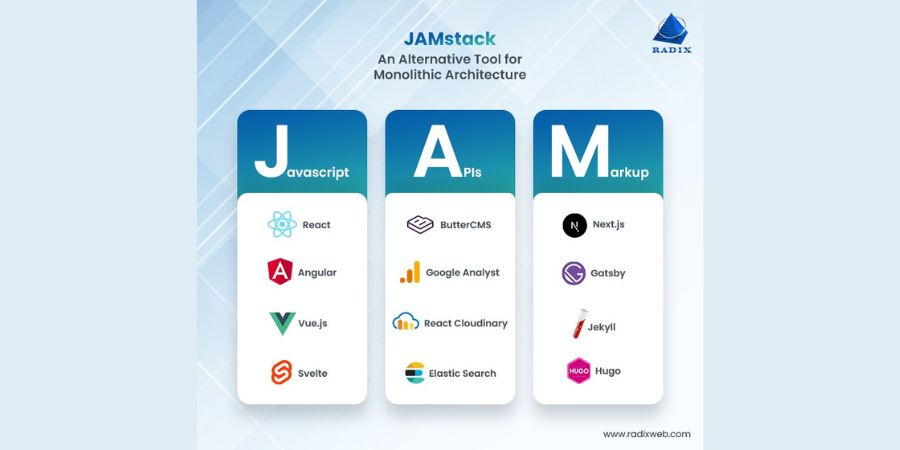
Jamstack describes an architecture that aims for a faster, more secure, easier-to-scale web experience through pre-rendering and decoupling. In plain terms: pages can ship as ready-to-serve files, and dynamic features arrive through APIs.
Use this quick fit test:
- Great fit: marketing sites, content-heavy brands, landing pages, product education hubs, documentation, many eCommerce front ends.
- Still possible, but confirm early: complex dashboards, heavy personalization, deep role-based access, real-time collaboration.
- Key question: “Which parts stay pre-rendered, and which parts need server logic?”
If the agency claims Jamstack solves every problem, treat that like a restaurant that claims it nails sushi, BBQ, and vegan cheesecake. Maybe. But ask harder questions.
Lock The Scope And Success Metrics Before You Talk Features
Non-technical buyers often ask for features first (“We need a blog, filters, forms…”). Strong teams start with outcomes. Ask the agency to translate goals into measurable targets.
Checklist:
- Primary goal: leads, sales, sign-ups, bookings, or brand lift
- Top pages: the pages that matter most for revenue or trust
- Performance targets: load time goals for key templates (mobile matters most)
- Content workflow: who edits what, who approves, who publishes
- SEO requirements: redirects, metadata, schema, indexation, sitemap ownership
- Timeline constraints: launch date, campaign deadlines, seasonal peaks
Then ask: “What would make this project a clear success in 90 days after launch?” If they cannot answer, you risk a pretty build that does not move the needle.
Validate Proof Without Reading Code (Portfolio Questions That Work)
You do not need to review Git commits. You need to confirm that the agency ships real Jamstack outcomes and handles real-world tradeoffs.
Ask for 3–5 relevant examples, then use this checklist:
- “Show me before/after results (speed, SEO, conversion, or content velocity).”
- “Which platform did you use for hosting and deployments, and why?”
- “How did you handle forms, search, and transactional flows?”
- “Which CMS did the client use, and what did editors like or hate?”
- “What broke after launch, and how did you fix it?”
Also, ask who does what. Jamstack projects often combine design, front-end, CMS modeling, integrations, and DevOps.
A confident agency can name the roles and responsibilities without vague fog.
Demand A Clear Content And CMS Plan (This Is Where Projects Get Messy)
Jamstack still needs content. Many agencies “finish the site” and leave your team stuck with an editor experience that feels like a cockpit.
Jamstack commonly uses APIs and a decoupled front end; content can come from a headless CMS or other services. Your checklist:
- CMS selection rationale: why that CMS fits your team, not just the dev team
- Content types: pages, posts, case studies, products, locations, authors
- Reusable components: hero, FAQ, testimonials, pricing blocks, CTAs
- Governance: drafts, approvals, roles, audit trail (if needed)
- Migration plan: what moves, what gets rewritten, what gets archived
- Training: documented steps for editors, plus a live walkthrough recording
Key question: “Can you show me how a non-technical editor publishes a page, adds SEO fields, and previews changes before launch?”
Live Preview in a Headless CMS with Next.js
Check Performance, Security, And Reliability Practices (The Unsexy Stuff That Saves You)
Jamstack can boost resilience because it favors pre-rendered delivery and decoupled architecture. Still, quality depends on execution.
Ask for these practices:
- Performance: image strategy, font loading approach, Core Web Vitals plan, caching rules
- Security: dependency updates, secret handling, form spam protection, admin access rules
- Reliability: uptime strategy, CDN usage, rollback process, incident response
- Monitoring: error tracking, performance monitoring, alerting ownership
- QA: device coverage, accessibility checks, SEO validation, redirect testing
Quick red flag: “We’ll optimize later.” Performance work belongs in the build, not in a post-launch panic.
Confirm Process, Pricing, And Ownership (So You Don’t Rent Your Own Website)
Jamstack agencies vary a lot in contracts and support. Get clarity early, in writing.
Checklist:
- Pricing model: fixed scope, time and materials, or phased delivery
- Deliverables: design files, component library, CMS schemas, documentation
- Ownership: you own code, content, and accounts (hosting, analytics, CMS)
- Access: your team has admin access, not “request access from us”
- Support: what happens after launch—SLA, response times, maintenance options
- Change control: how they quote changes, how they prevent scope creep
- Hand-off quality: repo setup, environment docs, runbooks, onboarding notes
Ask: “If we switch agencies next year, what do we keep, and what do we lose?” A good partner answers without drama.