
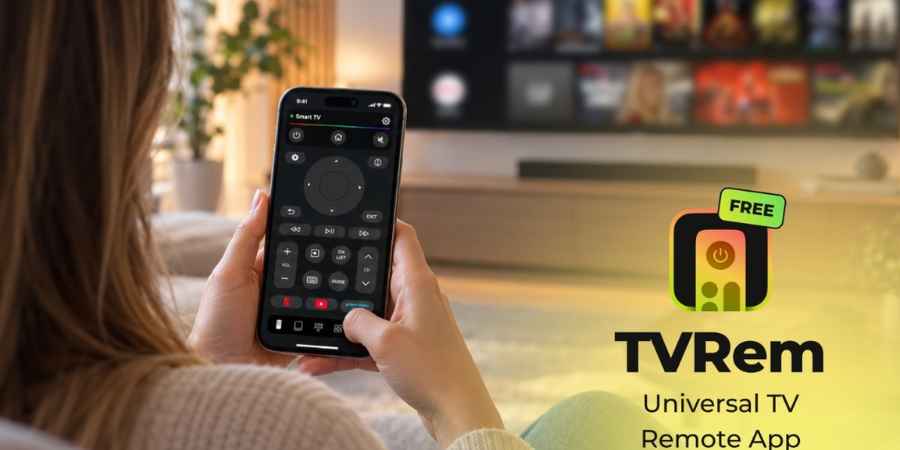
Losing the TV remote is one of those small everyday problems that can become surprisingly frustrating. It disappears under the sofa, gets left in another room, or simply stops working when the batteries run out. And with modern Smart TVs, the remote is used for much more than changing channels. You need it to search for movies, open streaming apps, adjust the volume, navigate menus, and sometimes enter passwords. Fortunately, there is another option: using an iPhone as a TV remote.
A free TV remote control app for iPhone can turn a device that is already in your hand into a convenient alternative to a traditional remote. Instead of keeping another physical controller nearby, you can connect your iPhone to a compatible Smart TV and use its screen and familiar touch controls for everyday navigation.
One example is TVRem, a universal remote app designed for iPhone and iPad. It supports a range of popular Smart TVs and streaming platforms, including Samsung, LG, Roku, Fire TV, Android TV, Google TV, and Apple TV.
Why Use an iPhone as a TV Remote?
The idea isn’t particularly complicated. Most modern Smart TVs are already connected to the same home Wi-Fi network as the devices people use every day. A remote control app can use that connection to communicate with the TV.
This approach has a few practical advantages. First, you don’t need to buy a replacement remote if the original one is lost or damaged. Second, your iPhone offers features that traditional remotes don’t always provide, such as a full keyboard and voice input.
There is also a simple convenience factor. Most people keep their phones close by throughout the day, while a TV remote can easily disappear between couch cushions. Of course, compatibility matters. Not every television works with every remote app, and the exact setup can vary between brands and models. Generally, the iPhone and TV need to be connected to the same Wi-Fi network before the app can discover the television.
Meet TVRem: A Free Universal Remote App for iPhone
TVRem takes the basic idea of an iPhone remote and combines several everyday TV controls into one application. The app is available for iPhone and iPad and is designed to work with a broad selection of Smart TVs and streaming devices. According to its current App Store listing, supported platforms include Samsung Smart TVs, LG Smart TVs, Roku, Fire TV, Android TV, and Google TV. It also supports Apple TV models.
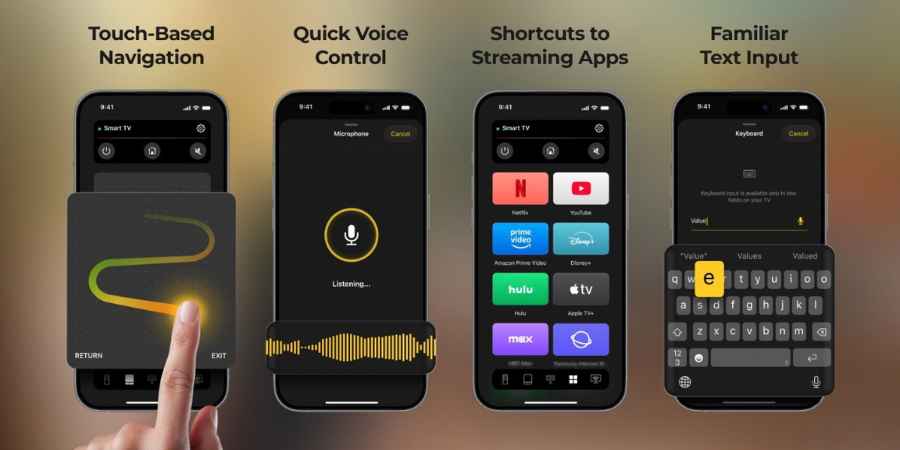
What makes TVRem particularly interesting isn’t simply that it can replace a physical remote. It’s the way it uses the capabilities of a smartphone to make certain TV interactions easier. For example, typing a movie title with a traditional remote can be slow. On a phone, you can simply use the familiar keyboard.
Similarly, navigating a Smart TV interface with directional buttons isn’t always the quickest experience. A touchpad-style interface can make moving through menus feel more natural. You can learn more about how the app works and which devices it supports on the TVRem universal TV remote page.
A Keyboard Is One of the Most Useful Features
One of the less obvious advantages of using an iPhone as a remote is typing.
Anyone who has tried searching for a movie or entering a password with a traditional TV remote knows how tedious it can be. You have to move between letters on the screen one character at a time.
TVRem allows users to enter text using the iPhone’s keyboard instead. This can be useful when searching for movies and shows, entering passwords, or looking for a particular application.
It’s a small feature, but it addresses one of the most annoying parts of using a Smart TV.
Instead of spending a minute navigating through an on-screen keyboard, you can type directly on your phone.
Touchpad Controls Make Navigation More Familiar
Another feature worth considering is touch-based navigation. Traditional TV remotes typically rely on directional buttons. That’s perfectly functional, but it can feel somewhat outdated compared with how people interact with smartphones. TVRem includes touchpad controls that allow users to swipe through menus and tap to select items.
For someone who already spends a significant amount of time navigating their phone with gestures, this can be an intuitive way to interact with a television. It’s particularly useful when browsing Smart TV menus or navigating between different applications.
Voice Input Can Make Searching Faster
Modern smartphones have made voice input a normal part of everyday communication, so bringing it into TV navigation makes sense. TVRem supports voice input on compatible setups, allowing users to use their voice for searching and other controls. The app’s documentation also notes support for Google Assistant or Alexa on supported devices.
Imagine looking for a particular movie. Instead of opening the TV keyboard and selecting each letter individually, you can use your phone to enter the search query. This doesn’t necessarily replace every traditional remote function, but it can make specific tasks considerably faster.
One App for Different Smart TV Platforms
The word “universal” is important when talking about TV remote apps. Many households have more than one entertainment device. Someone might have a Samsung TV in the living room, a Roku device connected to another television, or an Apple TV used for streaming.
Having a separate remote for every device can quickly become inconvenient. TVRem is designed to cover several of these ecosystems from one iOS application. Its current compatibility information includes Samsung and LG Smart TVs, Roku devices, Fire TV, Android TV, Google TV, and Apple TV. Compatibility can depend on the specific model and setup, so checking supported devices before installation is still a good idea.
How to Connect an iPhone to a Smart TV
Getting started with a TV remote app is generally straightforward. The first step is to make sure both devices are connected to the same Wi-Fi network. This is important because the app needs to discover the TV over the local network.
With TVRem, the basic process is:
- Install TVRem on your iPhone.
- Make sure your iPhone and Smart TV are connected to the same Wi-Fi network.
- Open the application.
- Select your TV from the available devices.
- If requested, enter the pairing code displayed on the TV.
- Start using your iPhone as the remote.
The exact pairing process can vary depending on the TV platform. Some devices may require an additional permission or confirmation before allowing mobile control. Once the connection has been established, the phone can be used for common functions such as changing the volume, navigating menus, controlling playback, and launching applications.
What About a Lost Remote?
This is probably the most obvious situation where an iPhone remote app becomes useful. Imagine sitting down to watch something and realizing the physical remote isn’t anywhere nearby. Normally, you’d have to search for it or order a replacement.
If the TV is already connected to your home network and the app is compatible, your iPhone can provide another way to control it. TVRem is available as a free download on the App Store, so there’s no need to purchase a separate physical controller just to get basic remote functionality.
It’s also useful beyond emergencies. Some people may simply prefer using their phone because it is easier to type on and already stays within reach.
Is a Free TV Remote App Really Free?
This is an important question when choosing any free app. Some applications are advertised as free downloads but put important features behind subscriptions or paywalls. TVRem is currently listed as a free app on the App Store, and its official product information states that it does not require a subscription to use its remote control features. That makes the app worth considering for people who simply want an alternative way to control their television without purchasing additional hardware. As always, it’s worth checking the current App Store listing because app features and pricing models can change over time.
What TVs Can You Control With an iPhone?
The answer depends on the application and the specific TV model.
TVRem currently supports several of the most common Smart TV ecosystems, including:
- Samsung Smart TVs
- LG Smart TVs
- Roku TVs and streaming players
- Amazon Fire TV
- Android TV
- Google TV
- Apple TV
The app’s official information notes that compatibility may vary depending on the particular model and device configuration.
This is an important distinction. A “universal” remote app doesn’t necessarily mean every television ever made will work with it. These applications are primarily designed for modern Smart TVs and compatible streaming devices that support network-based control.
iPhone Remote vs. Traditional Remote
Does an iPhone completely replace a traditional TV remote? For many everyday situations, it can. A physical remote still has advantages. It doesn’t need to be unlocked, it has dedicated buttons, and some people simply prefer the tactile experience. But an iPhone offers a different set of benefits.
You get a full keyboard, touch gestures, voice input, and the ability to launch applications from a device that is probably already sitting next to you. There is also less hardware to keep track of. Instead of having a dedicated controller for every TV or streaming device, one smartphone can potentially handle several compatible devices. The best option ultimately comes down to personal preference.